

🕐 Read Time: 16 min
Last Update: October 2026
Dermatologist Patient Intake Software for U.S. Clinics in 2027
Patient intake should do more than replace a paper clipboard with an online form.
For dermatology practices, the information collected before the visit can shape the entire encounter. Skin-condition history, medications, previous dermatology treatments, biopsy history, cosmetic procedures, allergies, consent, and other details may all be relevant before the dermatologist enters the room.
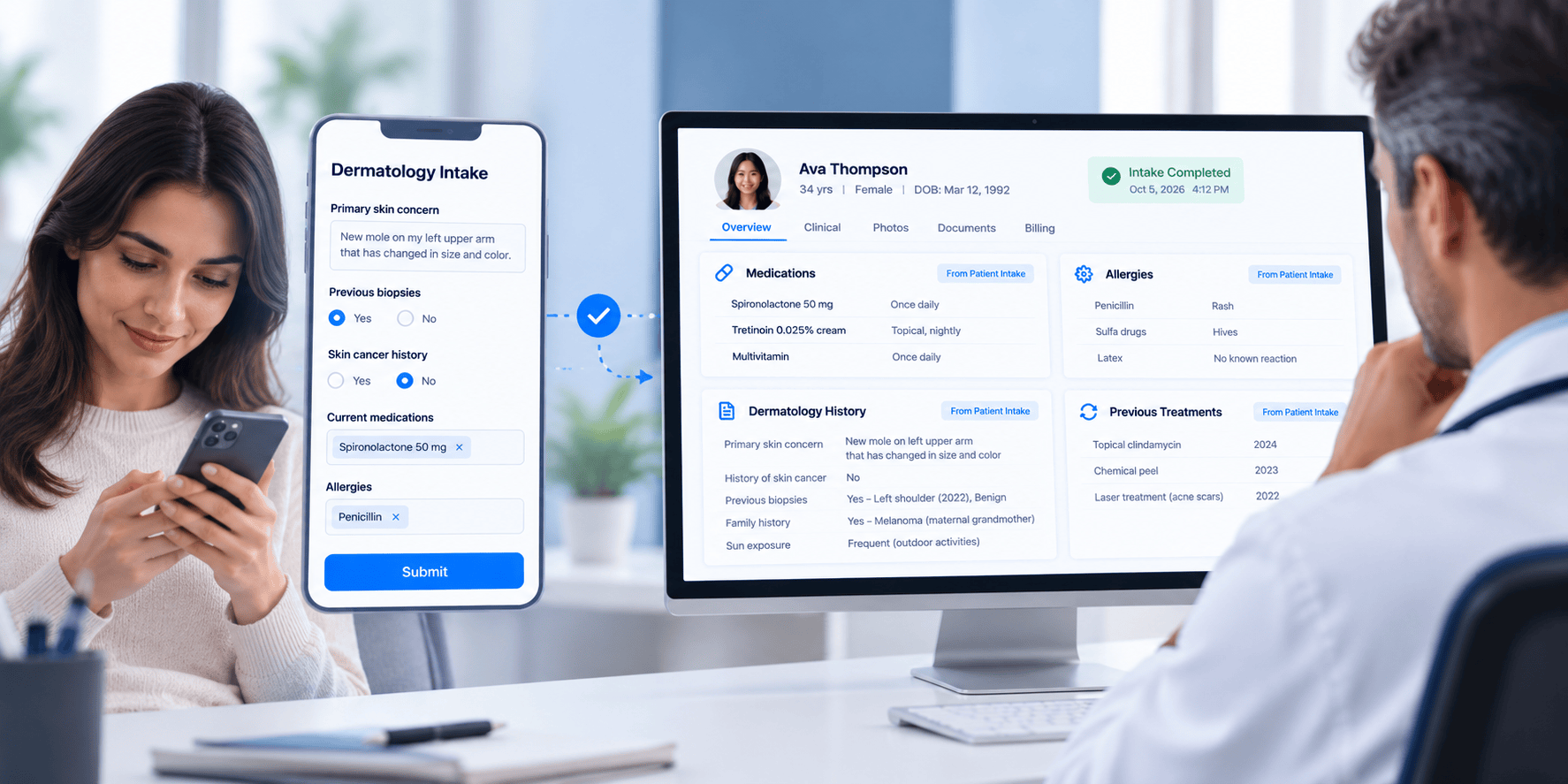
Dermatologist patient intake software helps practices collect this information digitally before the appointment and move relevant responses into the patient record without requiring staff to manually re-enter everything.
This guide explains what dermatology patient intake software should include, how medical and cosmetic intake workflows differ, how auto-charting works, and what practices should evaluate when choosing a digital intake system.
What Is a Dermatologist Patient Intake Software?
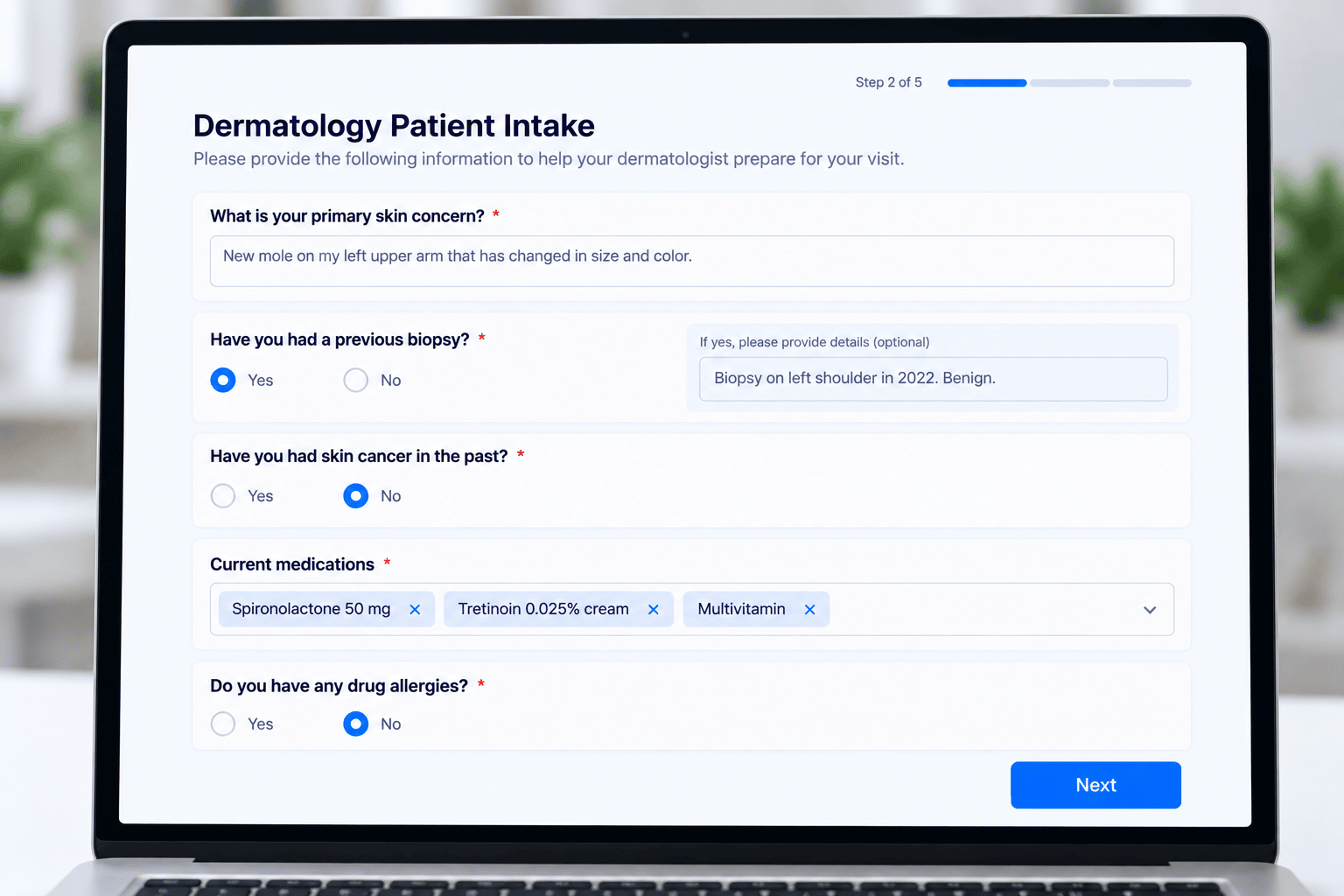
Dermatologist patient intake software allows patients to complete intake forms digitally before their appointment.
Instead of filling out paperwork in the waiting room, patients can provide information from their phone or computer before arriving.
Depending on the practice and appointment type, intake may include:
- Demographics
- Insurance information
- Current medications
- Allergies
- Current skin concerns
- Previous dermatology diagnoses
- Treatment history
- Biopsy history
- Skin cancer history
- Skincare products
- Cosmetic treatment history
- Procedure-specific information
- Consent
The important difference is what happens after the patient submits the form.
A basic digital form may simply create a PDF or document for staff to review.
A more connected intake workflow can move relevant information into structured areas of the patient record, reducing repetitive data entry and giving the provider more context before the visit begins.
Why Dermatology Intake Is Different From General Patient Intake
A standard medical intake form may capture basic history, medications, allergies, and insurance.
Dermatology often requires more specific information.
For example, a dermatologist evaluating a suspicious lesion may want to know about:
- Previous skin cancers
- Family history of melanoma
- Prior biopsies Changes in the lesion
- Sun exposure
- Medications
- Anticoagulant use
A cosmetic consultation may require very different information, including:
- Previous cosmetic procedures
- Treatment areas
- Aesthetic goals
- Previous reactions
- Current skincare products
- Procedure-specific consent
A follow-up visit for psoriasis, acne, or eczema may only need an update on symptoms, medications, treatment response, and new concerns.
That is why dermatology intake works better when forms can change based on the type of appointment rather than sending every patient the same questionnaire.
What Should a Dermatology Patient Intake Form Capture?
Medical and Dermatological History
The intake process should give the dermatologist useful clinical context before the encounter.
Depending on the visit, this may include:
- Current skin conditions
- Previous dermatologic diagnoses
- Prior treatments
- Previous biopsies
- History of skin cancer
- Dermatologic procedures
- Relevant surgical history
- Previous treatment outcomes
The goal is not to collect every possible question from every patient.
The goal is to collect information relevant to the upcoming visit.
Current Medications and Allergies
Medication history can affect dermatology treatment and procedure planning.
Relevant information may include:
- Prescription medications
- Topical medications
- Biologics
- Immunosuppressants
- Antibiotics
- Retinoids
- Anticoagulants
- Over-the-counter products
Allergies and previous reactions should also be captured before treatment decisions are made.
Skincare Regimen
For both medical and cosmetic dermatology, the patient’s current skincare routine may be useful.
Forms may ask about:
- Retinoids
- Exfoliating acids
- Prescription topicals
- Sunscreen
- Acne products
- Pigmentation treatments
- Other active skincare ingredients
This can give the dermatologist additional context when evaluating treatment response or planning a cosmetic procedure.
Skin Cancer and Family History
For relevant medical dermatology visits, intake may capture:
- Personal history of melanoma
- Basal cell carcinoma
- Squamous cell carcinoma
- Precancerous lesions
- Family history of skin cancer
- Previous biopsies
Structured intake allows this information to be available before the examination instead of being collected entirely during the visit.
Sun Exposure History
Depending on the appointment, useful information may include:
- Occupational sun exposure
- Tanning-bed use
- History of significant sunburns
- Current sun protection habits
These questions should be used where clinically relevant rather than automatically added to every intake form.
Cosmetic Treatment History
For cosmetic dermatology, intake can capture:
- Previous injectables
- Fillers
- Laser treatments
- Chemical peels
- Cosmetic procedures
- Previous treatment outcomes
- Treatment areas of interest
- Aesthetic goals
This allows the consultation to begin with a clearer understanding of what the patient has previously tried and what they are looking for.
Consent
Some dermatology workflows may require specific consent before a procedure.
Digital intake can help practices collect and organize consent for workflows such as:
- Biopsy
- Excision
- Laser procedures
- Injectables
- Photography
- Other procedures
The consent workflow should clearly document what the patient agreed to and when.
Medical and Cosmetic Dermatology Intake Should Not Be the Same
Practices offering both medical and cosmetic services should avoid using one universal form for every visit.
Medical Dermatology Intake
A medical dermatology intake form may focus on:
- Skin concerns
- Symptoms
- Diagnosis history
- Medications
- Allergies
- Previous treatments
- Biopsies
- Skin cancer history
- Family history
Cosmetic Dermatology Intake
A cosmetic intake form may focus more heavily on:
- Treatment goals
- Areas of concern
- Previous cosmetic procedures
- Skincare routine
- Previous reactions
- Relevant medications
- Consent
- Treatment preferences
Both belong to the same patient record, but the information required before each appointment can be very different.
Different Visits Need Different Intake Forms
Dermatology practices manage many appointment types.
Patient intake should adapt to them.
New Patient Consultation
A new patient may need the most comprehensive form.
This can include:
- Demographics
- Insurance
- Medical history
- Dermatology history
- Medications
- Allergies
- Previous treatments
- Family history
- Current concerns
Biopsy or Procedure Visit
A procedure-focused form may capture:
- Medication updates
- Allergies
- Anticoagulant use
- Procedure-specificquestions
- Consent
- New health changes
Cosmetic Consultation
A cosmetic intake may include:
- Treatment goals
- Previous procedures
- Areas of concern
- Skincare regimen
- Previous reactions
- Cosmetic history
Injectable Appointment
The form may focus on:
- Previous injectable treatments
- Product history
- Treatment areas
- Allergies
- Medication changes
- Consent
Chronic Condition Follow-Up
An established patient may only need a short update covering:
- Symptom changes
- Medication changes
- Treatment response
- Side effects
- New concerns
Shorter forms can reduce unnecessary questions for returning patients while still giving the provider the information needed for the visit.
How Auto-Charting Changes Patient Intake
The biggest difference between a digital form and a connected intake workflow is what happens to the data after submission.
If staff still need to read every response and re-enter the information manually, the clipboard has become digital, but the underlying administrative work has not changed very much.
Auto-charting can move appropriate patient-submitted information into structured sections of the record.
Depending on the workflow, this may include:
- Medications
- Allergies
- Medical history
- Dermatology history
- Treatment history
- Cosmetic concerns
- Consent information
The provider can then review the information instead of rebuilding the patient’s history from the beginning.
Edvak’s Patient Intake with Auto Charting is designed to connect the intake process directly with the patient record.
How Patient Intake Works in Edvak
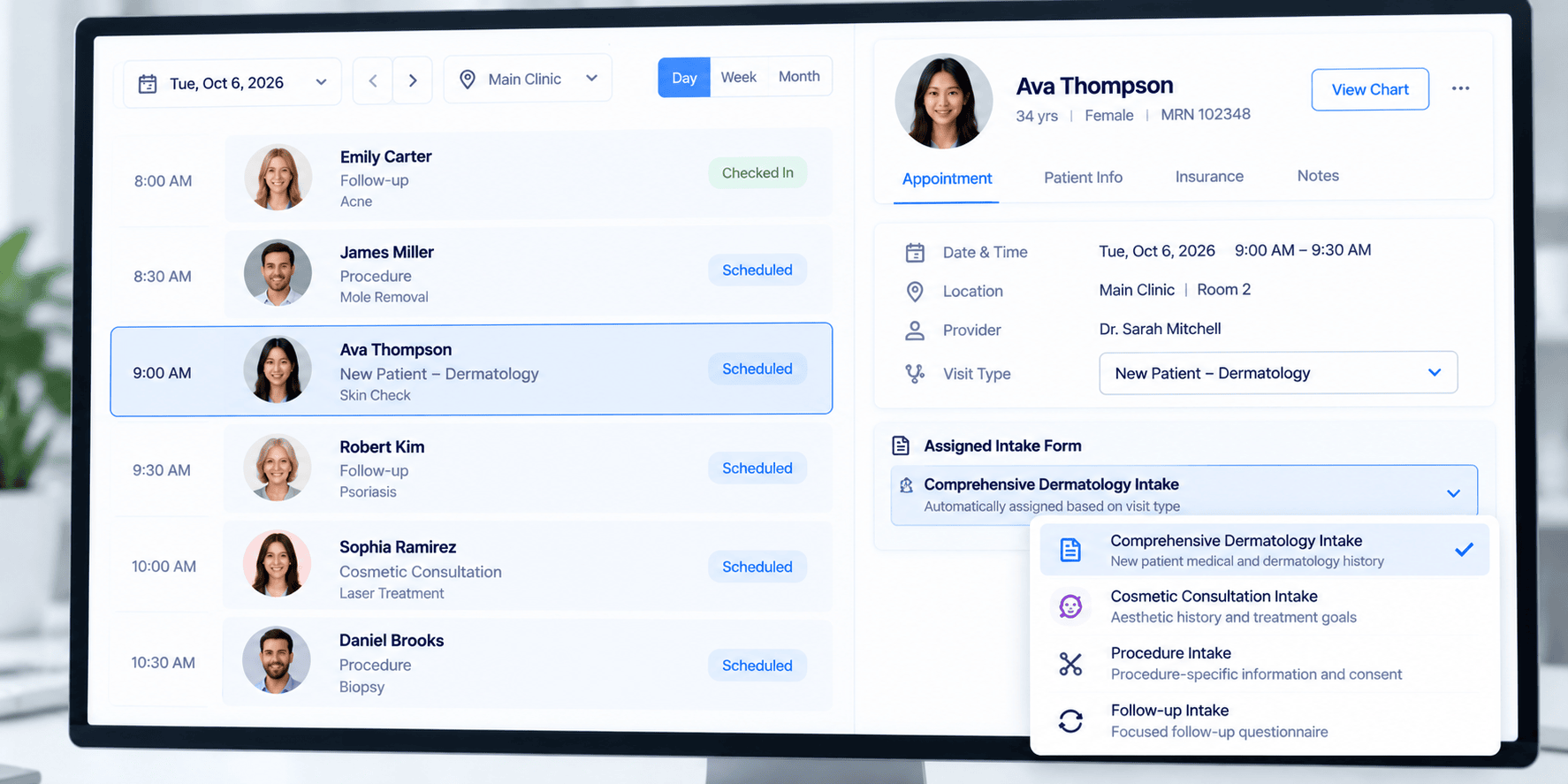
Forms Can Be Triggered by Appointment Type
Different appointment types can use different intake workflows.
For example:
New patient dermatology consultation
→ Comprehensive dermatology intake
Cosmetic consultation
→ Cosmetic history and treatment goals
Procedure appointment
→ Procedure-specific information and consent
Follow-up visit
→ Updated symptoms and medication changes
This helps practices collect relevant information without asking every patient to complete the same lengthy form.
Patients Can Complete Forms Before the Visit
Patients can receive intake forms before arriving at the practice.
Completing the form in advance gives patients time to check information such as:
- Medication names
- Previous procedures
- Treatment dates
- Skincare products
- Medical history
It also reduces the amount of paperwork that needs to be completed at check-in.
Submitted Information Can Flow Into the Chart
With Patient Intake with Auto Charting, relevant submitted information can move into the patient record.
This reduces the need for staff to manually transfer every answer from an intake form into the EHR.
The dermatologist can then review the intake information before or during the encounter.
How Intake Connects With Clinical Documentation
Patient intake and clinical documentation should work together, but they serve different purposes.
Intake captures information provided by the patient before the encounter.
Clinical documentation captures what happens during the encounter.
When these workflows are connected, the dermatologist begins the visit with useful patient context already available.
Edvak’s Conversation Capture to Structured Notes and AI-Powered Documentation can then support documentation during the visit.
For a closer look at this workflow, see the AI documentation workflow for dermatology.
Patient Intake and Pre-Visit Communication
Intake is also part of the broader pre-visit experience.
A patient may need:
- Appointment confirmation
- Intake form
- Insurance information
- Preparation instructions
- Reminder
- A way to contact the practice
Edvak’s Automated Care Reminders can support appointment-related communication.
2-Way SMS Chat gives patients a way to communicate with the practice when they have questions or need to respond.
This can help keep the intake process connected to the appointment rather than treating the form as a standalone administrative task.
Procedure-Specific Preparation
Some dermatology appointments require patients to prepare before arriving.
Depending on the procedure and the practice’s protocol, communication may include:
- Medication instructions
- Skincare restrictions
- Sun-exposure guidance
- Arrival instructions
- Procedure preparation
- Post-procedure expectations
The intake and reminder workflow can help practices send the right information for the right appointment type.
Digital Consent and the Patient Record
Consent collected digitally should be connected with the patient and relevant procedure.
Practices should be able to determine:
- Which consent was completed
- When it was completed
- Which patient submitted it
- Which procedure it relates to
- Where the consent is stored
Consent should not become another document staff have to locate manually after the visit.
Patient Intake for Medical and Cosmetic Practices
Practices that offer both medical and cosmetic dermatology have additional intake requirements.
The same patient may interact with the practice for:
- Acne treatment
- Skin cancer screening
- Biopsy
- Botox
- Fillers
- Laser treatment
- Cosmetic consultation
Using separate systems for medical and cosmetic intake can fragment the patient record.
A connected system allows appointment-specific intake while keeping the patient’s information in one longitudinal record.
For a broader look at the clinical capabilities dermatology practices should evaluate, see our Best Dermatology EHR Software for U.S. Practices in 2026 guide.
Patient Intake as Part of Dermatology Practice Management
Intake is only one part of running the practice.
It should connect with:
- Scheduling
- Online booking
- Eligibility
- Reminders
- Tasks
- Patient communication
- Billing
- Reporting
For example:
Appointment booked → Intake sent → Patient completes form → Information enters record → Eligibility checked → Reminder sent → Patient arrives prepared
That is different from managing each step independently.
For a deeper look at the operational side, see our dermatology practice management software guide.
Patient Intake and Insurance Information
Medical dermatology practices often need insurance information before the visit.
Digital intake can help collect:
- Insurance carrier
- Member details
- Subscriber information
- Updated insurance cards
- Other required information
When paired with Real-Time Insurance Eligibility Checks, practices can verify coverage before the encounter rather than discovering coverage issues at checkout or during billing.
Patient Intake and Billing
Patient intake does not determine the final billing code.
However, accurate pre-visit information can support more complete documentation.
For example, the patient’s:
- Medication history
- Prior treatment
- Current symptoms
- Procedure history
- Insurance information
can provide useful context for the clinical encounter.
The dermatologist still documents the care provided, and the approved clinical documentation supports downstream coding and billing workflows.
This keeps the roles clear:
Patient intake provides context.
The clinical encounter establishes the documentation.
Approved documentation supports coding and billing.
Patient Intake and Inventory
For cosmetic dermatology, intake may capture information about previous injectables or treatments.
Inventory management is a separate operational workflow, but the two can connect around the patient encounter.
Once treatment is performed, the practice may need to record:
- Product
- Quantity
- Lot number
- Expiration date
- Treatment location
For more detail, see the dermatology inventory tracking guide.
What to Look for in Dermatology Patient Intake Software
When evaluating patient intake software, practices should ask whether it supports the following.
Appointment-Specific Forms
Can different visit types trigger different forms?
Custom Dermatology Questions
Can the practice configure fields around its medical and cosmetic workflows?
Mobile-Friendly Completion
Can patients complete the form easily from a phone?
Structured Data
Does submitted information move into useful chart fields, or does the system simply store a PDF?
Auto-Charting
Can appropriate responses populate the patient record without manual re-entry?
Consent Management
Can digital consent be collected and associated with the relevant procedure?
Insurance Information
Can the practice collect updated insurance details before the visit?
Patient Communication
Can reminders and messaging connect with the intake process?
Medical and Cosmetic Workflows
Can the system support both without creating separate patient records?
EHR Integration
Is the intake workflow part of the EHR, or does staff need to move data between systems?
How Edvak Supports Dermatology Patient Intake
Edvak connects patient intake with the broader patient and practice workflow.
Patient Intake with Auto Charting can support appointment-specific forms and structured intake information.
The workflow can connect with:
- Scheduling
- Automated Care Reminders
- 2-Way SMS Chat
- AI-Powered Documentation
- Real-Time Insurance Eligibility Checks
- Patient records
- Billing workflows
This allows the intake process to become part of the patient journey rather than a separate form-management task.
Edvak is designed to support healthcare organizations of different sizes, from independent practices and multi-location groups to larger healthcare organizations.
Security and Privacy for Digital Patient Intake
Patient intake forms can contain protected health information, so security should be part of any software evaluation.
Practices should review:
- Encryption
- Access controls
- Audit logging
- Data storage
- Business Associate Agreement
- User permissions
- Security policies
- Data retention
- Data export
HIPAA compliance depends on both the technology and how the organization configures and uses it.
Practices should review the vendor’s safeguards and agreements as part of due diligence rather than relying only on a general compliance statement.
Can Digital Intake Help Reduce Front-Desk Work?
Digital intake can reduce certain repetitive administrative tasks when patients complete information before arriving and submitted information flows into the record.
Potential areas of reduced manual work include:
- Handing out forms
- Scanning paperwork
- Entering demographics
- Updating medications
- Recording allergies
- Collecting history
- Locating consent documents
The amount of time saved depends on the practice’s existing workflow, patient completion rates, and how deeply the intake system connects with the EHR.
Can Digital Intake Help With No-Shows?
Patient intake should not be treated as a standalone no-show solution.
However, intake can be part of a broader pre-visit engagement workflow that includes:
- Appointment confirmation
- Digital forms
- Preparation instructions
- Reminders
- Two-way communication
These touchpoints can help patients stay informed and engaged before the visit.
Practices should measure their own completion, cancellation, and no-show rates rather than assuming that intake alone will produce a specific reduction.
Questions to Ask During a Patient Intake Software Demo
Can you show me a new dermatology patient intake workflow?
The vendor should demonstrate the complete process from appointment booking through form completion and chart population.
Can different appointment types use different forms?
Ask to see examples for medical, cosmetic, procedure, and follow-up visits.
Where does the submitted information go?
Ask whether responses populate structured EHR fields or remain in a separate document.
Can we configure our own dermatology-specific questions?
The practice should be able to adapt forms to its workflows.
How are medication and allergy updates handled?
Ask what happens when a returning patient reports a change.
How does digital consent work?
Ask where the completed consent is stored and how staff retrieve it.
Can intake connect with insurance eligibility?
Ask how insurance information flows into the pre-visit process.
What happens if the patient does not complete the form?
Ask how staff identify incomplete intake and whether reminders can be sent.
Can the system support both medical and cosmetic dermatology?
Ask the vendor to demonstrate both workflows.
How is patient data protected?
Review security controls, access permissions, audit logs, and the Business Associate Agreement.
Frequently Asked Questions About Dermatologist Patient Intake Software
What is dermatologist patient intake software?
Dermatologist patient intake software allows patients to complete specialty-specific forms digitally before their appointment.
A connected intake system can move appropriate patient-submitted information into the EHR, reducing manual re-entry and giving the provider useful context before the visit.
What should a dermatology intake form include?
The form should reflect the appointment type.
Depending on the visit, it may include:
- Skin concerns
- Dermatology history
- Medications
- Allergies
- Previous treatments
- Biopsy history
- Skin cancer history
- Family history
- Skincare regimen
- Cosmetic treatment history
- Consent
What is auto-charting?
Auto-charting allows information submitted through an intake form to populate appropriate structured areas of the patient record.
Instead of staff manually transferring every response, the information can be made available for review inside the EHR.
Can dermatology practices use different forms for different appointments?
Yes.
A new patient consultation, biopsy follow-up, cosmetic consultation, and chronic-condition follow-up may each require different information.
Appointment-specific forms can make the intake process more relevant and shorter for the patient.
Can digital intake support both medical and cosmetic dermatology?
Yes.
Medical and cosmetic workflows can use different intake forms while keeping the information within the same patient record.
Does digital intake replace the clinical interview?
No.
Patient-submitted information provides context before the encounter.
The dermatologist still reviews relevant information, conducts the examination, asks follow-up questions, and documents the clinical encounter.
Can intake information flow into clinical documentation?
Yes, when the intake system is connected with the EHR.
Patient-submitted history can be available as context when the provider documents the encounter.
Is digital patient intake HIPAA compliant?
A digital intake platform handling protected health information should support appropriate HIPAA safeguards.
Practices should evaluate encryption, access controls, audit logs, data handling, the Business Associate Agreement, and their own configuration and policies.
Can patient intake reduce front-desk data entry?
It can reduce manual work when patients complete forms before arriving and the submitted information populates the patient record directly.
The actual impact depends on how the practice configures and uses the workflow.
Start the Visit With the Right Information Already Available
The value of dermatologist patient intake software is not simply that the form is digital.
The value comes from collecting the right information for the right appointment and making that information useful before the visit begins.
A connected workflow can help practices move from:
Appointment booked → Intake completed → Chart updated → Patient prepared → Provider informed
without requiring staff to manually rebuild the same information at every step.
For dermatology organizations looking to connect patient intake with scheduling, communication, documentation, eligibility, and other workflows, Edvak’s Patient Intake with Auto Charting brings the intake process into the broader EHR and practice management workflow.
Ready to take the next step?
Get a personalized demo and see how Edvak can drive real impact to your practice.
Related Blogs




More Categories
Edvak.com Terms & Conditions Privacy Policy © 2026 Edvak. All rights reserved.